
Download CyE File Renamer – Free Bulk File Renaming Tool for Windows, Mac, Android & iOS
CyE File Renamer is a powerful, secure, and efficient software tool designed for users who need to rename multiple files quickly and accurately. Whether you're managing a large media library, organizing digital photos, or preparing documents for a project, this bulk file renaming utility simplifies the process with advanced automation features. With over 40 customizable renaming rules, CyE File Renamer supports complex naming patterns, sequential numbering, date-based renaming, and metadata extraction.
The intuitive interface makes it easy for beginners, while the command-line support offers automation capabilities for advanced users. All operations are safe and reversible thanks to the built-in preview function, ensuring no accidental data loss. Available for Windows, Mac, Android, and iOS, this free tool is ideal for both personal and professional use.
Key Features of CyE File Renamer
CyE File Renamer stands out in the crowded field of file management tools thanks to its rich feature set and attention to detail. One of the most powerful aspects is its collection of over 40 built-in renaming rules. These rules cover everything from simple prefix and suffix additions to complex transformations using regular expressions, character replacements, and case modifications. For example, you can rename all JPEG files in a folder by adding the current date, strip unwanted characters, or convert file names to lowercase with just a few clicks.
The software also includes a real-time preview pane that displays how each file will be renamed before any changes are applied. This is crucial for avoiding mistakes, especially when working with large batches of files. The preview allows you to double-check the output, ensuring consistency and accuracy. Another standout feature is the ability to extract metadata—such as EXIF data from photos or ID3 tags from audio files—directly into the file name, making it ideal for media organizers.
For power users, CyE File Renamer supports command-line operations through saved rule files, enabling integration into scripts and automated workflows. This makes it a perfect fit for developers, system administrators, or anyone who needs to perform repetitive renaming tasks across multiple projects. Additionally, the tool maintains file integrity by preserving original file extensions and supporting batch processing without errors. With support for multiple platforms—including Windows, Mac, Android, and iOS—CyE File Renamer is a truly cross-platform solution for modern users who manage files across devices.
How to Install and Use CyE File Renamer
Getting started with CyE File Renamer is quick and hassle-free. To download the software, visit the official website and select the version compatible with your operating system—Windows, Mac, Android, or iOS. The installation process is straightforward: simply run the installer, follow the on-screen prompts, and complete the setup. The application launches immediately after installation, requiring no additional configuration.
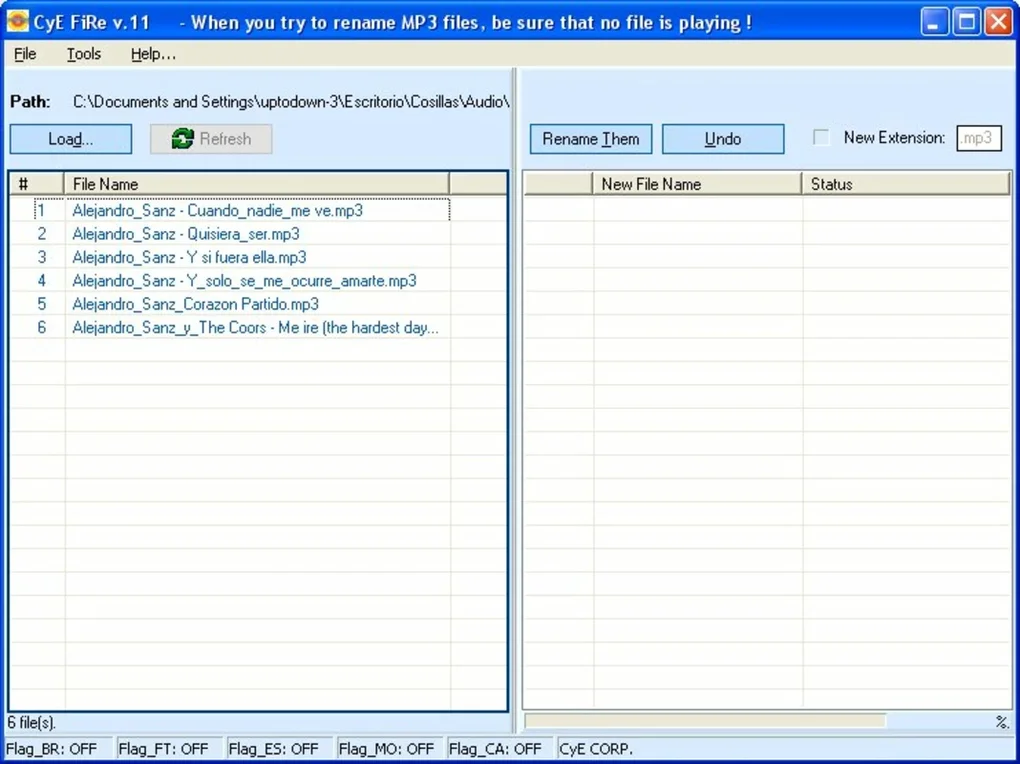
Once opened, you’ll be greeted by a clean, intuitive interface divided into several sections: a file list, a rule editor, and a preview window. Begin by clicking “Add Files” or dragging and dropping your desired files into the interface. You can select individual files or entire folders. Next, navigate to the “Rules” tab to choose from the 40+ available renaming options. For instance, you might select “Insert Date” to add the current date to all file names, or “Replace Text” to remove specific characters.
After applying your chosen rules, the preview window updates in real time, showing the new file names. This is the moment to verify everything is correct. If satisfied, click “Rename” to execute the changes. The software will process each file and apply the new names without altering the original file content. For advanced users, you can save your rule sets as .cyr files and later load them via the command line, enabling automation in batch scripts or scheduled tasks.
Regular updates are released to improve performance, fix bugs, and add new features. Keeping your version up to date ensures maximum security and compatibility. The tool is completely free to use, with no hidden costs or ads, making it one of the most trusted bulk renaming tools available today.
Compatibility and System Requirements
CyE File Renamer is designed to run smoothly across a wide range of devices and operating systems. It is fully compatible with Windows 7 and later versions, including Windows 10 and Windows 11. On macOS, the software supports macOS 10.13 (High Sierra) and above, ensuring compatibility with both Intel and Apple Silicon Macs. For mobile users, dedicated Android and iOS apps are available, allowing you to manage and rename files directly from your smartphone or tablet.
System requirements are modest, making it accessible even on older hardware. On desktop platforms, you’ll need at least 512 MB of RAM and 50 MB of free disk space. The application does not require admin privileges to run, which enhances security and usability in shared or restricted environments. The mobile versions are optimized for touch interfaces and support file browsing through local storage and cloud services like Google Drive and iCloud.
Whether you’re renaming hundreds of photos from a recent trip, organizing academic papers, or preparing assets for a website, CyE File Renamer handles the job efficiently. Its cross-platform nature means you can start renaming on your PC, continue on your tablet, and finalize on your phone—all while maintaining consistent naming rules. This seamless integration across devices makes it a versatile tool for both casual users and professionals.
Pros and Cons of CyE File Renamer
- Pros:
- Over 40 customizable renaming rules for maximum flexibility
- Real-time preview prevents accidental renaming errors
- Free to download and use with no ads or hidden fees
- Supports command-line automation for advanced users
- Available for Windows, Mac, Android, and iOS
- Preserves file extensions and original data integrity
- Lightweight with minimal system resource usage
- Cons:
- No built-in cloud sync or backup feature
- Mobile app lacks some advanced features found in desktop version
- Limited customer support compared to paid alternatives
- No built-in undo function after renaming (though preview reduces risk)
- Interface could benefit from more customization options
Frequently Asked Questions (FAQ)
Is CyE File Renamer free to use?
Yes, CyE File Renamer is completely free to download and use. There are no subscription fees, ads, or in-app purchases. The software is open for personal and professional use without restrictions.
Can I rename files on my Android or iOS device?
Yes, CyE File Renamer offers native apps for both Android and iOS. You can install the app from your device’s app store and rename files directly on your smartphone or tablet, making it convenient for on-the-go file management.
Does the software support batch renaming?
Absolutely. CyE File Renamer is specifically designed for bulk file renaming. You can select hundreds or even thousands of files at once and apply consistent renaming rules across the entire batch.
Can I use CyE File Renamer with photos and videos?
Yes, the software supports metadata extraction from media files. You can rename photos and videos using EXIF data (like date taken, camera model) or ID3 tags (for audio files), which is perfect for organizing media libraries.
Is there a command-line version for automation?
Yes, advanced users can leverage the command-line interface by saving their renaming rules as .cyr files. This allows integration into batch scripts, scheduled tasks, or automated workflows, ideal for developers and system administrators.
Final Thoughts and Call to Action
CyE File Renamer is a reliable, secure, and highly efficient tool for anyone who regularly deals with file management. Whether you're a student organizing research papers, a photographer sorting thousands of images, or a business professional preparing reports, this software simplifies the renaming process with precision and ease. Its combination of user-friendly design, powerful features, and cross-platform availability makes it one of the best free file renaming tools available today.
With over 40 renaming rules, a foolproof preview system, and support for automation via command line, CyE File Renamer delivers exceptional value. While it lacks some advanced features like cloud backup or built-in undo, the overall experience remains smooth and error-free thanks to its thoughtful design.
Don’t let disorganized files slow you down. Download CyE File Renamer now and transform your file management workflow. Available for Windows, Mac, Android, and iOS—get started today and enjoy a clutter-free digital life.







